Showing posts with label EDU 685. Show all posts

Saturday, March 22, 2014

ePals Project Participation


As a requirement of my graduate program through Southern New Hampshire University, I am a student in a course entitled Global Educational Technology. The course focuses on the use of technology as part of a global education, highlighting several important aspects of 21st century learning. Students that have global technology educational experiences gain many important lessons such as cultural awareness, collaboration and communication. Authentic global learning experiences can also help students develop the tools needed to have safe, respectful, responsible and appropriate interactions in the digital world. These lessons are important experiences for our 21st century learners to have if they are to be successful after graduation.
http://www.teq.com/blog/wp-content/uploads/2009/11/logo_ePALS_hi_res.jpg

ePals is a website that connects classrooms in an effort to provide opportunities for collaboration. According to ePals (n.d)  “by engaging in authentic learning experiences about relevant issues, students, teachers and mentors learn and work together, strengthening core learning while motivating learners and building self-confidence and skills necessary for future careers”. Collaboration and self directed learning are two components essential to success in a global society. Learning experiences like ePals provide authentic opportunities for 21st century global communication.


http://cdn2.edutopia.org/files/imagecache/grid-3-column/slates/fb-social-global-learning-960x715.jpg

In order to truly experience learning which will prepare students for the world today, we must prepare students to be a part of the global world. According to Thomas Friedman’s lecture “The World is Flat” (2005) the world has essentially become flat, because technology has made participation in instant global communication a reality. In order to prepare our students for this flat world, we must provide them with as many real world experiences as possible. We can utilize the technologies that we already have to bring the flat world into the classroom. Tools such as ePals provide a plethora of engaging lessons and opportunities for student to learn and communicate globally.


References

ePals. (n.d.). ePals. Retrieved March 19, 2014, from http://www.epals.com/

Friedman, T. (2005, May 16). The World is Flat. MIT Video. Retrieved February 3, 2014, from
http://video.mit.edu/watch/the-world-is-flat-9145/

Saturday, March 15, 2014

Embedding Digital Texts

Technology is much more than just computer hardware and the internet. Technology includes digital text, online learning opportunities as well as software. In order for students to prepare to be successful in a global digital society, we need to utilize these tools in our classrooms, and not simply replace a paper and pencil with a computer for word processing. 

There are a variety of digital texts available that can be used for learning. Digital textbooks, story books and research materials can all be effective tools for learning. Digital textbooks and collections of digital materials provide students with a more up to date learning experience. Schools are no longer held to the high prices of print textbooks, and can even choose to curate their own materials. According to Davis (2013) Florida has "already adopted legislation requiring districts to spend half their instructional-materials budgets on digital content by 2015-16". These changes have prompted several textbook companies to develop apps and other digital content that are more accessible than their traditional textbooks. (Davis, 2013)

In addition to bringing digital text into our classrooms, we also need to utilize other learning opportunities such as e-learning, virtual courses and massive open online courses. Many sites, such as KhanAcademy.com offer learning dashboards that can be used by students and monitored by a teacher. Like Khan Academy, some sites are free, while others, such as Aleks.com, are fee based, though both provide individualized experiences based on a student's unique needs. Similarly, online or virtual courses, such as those through Virtual Learning Academy (VLACS.org, n.d.) provide a wide variety of students with individualized learning experiences that allow teachers to work one on one with students. These types of sites allow students to learn at their own pace, taking additional time as needed to practice each concept. 

In addition to digital texts and online courses, there are many open course softwares available to use in the classroom. Open source learning platforms, such as Moodle (Moodle.org), provide teachers and students with the opportunity to create their own web based courses. These tools can be used for blended learning or for 100% online learning opportunities (Moodle.org, n.d.). Since Moodle is web based, content can be easily accessed all over the world. Open source softwares provide tools for fully customized lessons and content. 

Utilizing these tools can help to reinforce the technology used in the classroom. They can also be used to personalize each student's learning and to make the content more accessible to all students. 


Resources

Moodle.org (n.d.).  MoodleDocs. Retrieved March 15, 2014, from http://docs.moodle.org/26/en/About_Moodle

Davis, M. R. (2013, February 6). 'Big Three' Publishers Rethink K-12 Strategies. Education Week: Digital Directions. Retrieved March 14, 2014, from http://www.edweek.org/dd/articles/2013/02/06/02textbooks.h06.html?cmp=ENL-DD-MOSTPOP

VLACS.org (n.d.). Virtual Learning Academy Charter School. Retrieved March 15, 2014, from http://vlacs.org/index.php?option=com_content&view=article&id=141&I

Thursday, February 27, 2014

Building Media Literacy

Using Blogger, create a post in which you describe how building media literacy in the K-12 classroom will enhance students’ skills needed in a global society.


Students may have been born with technology in their hands, and can navigate new apps like they created them, but they need more than that to survive in this technological world. Students need to be digitally literate. According to NAMLE (n.d.) media includes “all electronic or digital means and print or artistic visuals used to transmit messages”.  Media literacy, therefore, encompasses a wide variety of mass communication methods, such as text in books, blogs or magazines; as well as visual images such as those in commercials, advertisements, and online videos. 


Learning to decode and make meaning of these messages, as well as determining bias and audience are skills that our students need in order to be successful both in school and out. Practicing these skills in a safe environment such as the classroom can help students to discover meaning and develop understandings about media literacy that they can then translate to the communications they come across as a global citizen. 


When incorporating media literacy into the K-12 classroom, it is important to be explicit, teaching students about audience, bias, reliability, and to question what it is they see and hear, especially with regards to the internet. According to Thoman and Jolls (2003) students need "to learn how to find what they need to know when they need to know it-- and to have the higher order thinking skills to analyze and evaluate whether the information they find is useful for what they want to know." 


Although that may seem like a huge task, there are some basic things we can do in the classroom to foster those skills in our students.First and foremost, we need to allow our students to explore, and discover for themselves. Providing opportunities for students to delve deeper into the images and other media they see can easily become a learning experience. These learning experiences can be heightened by simply asking questions. For students of all ages, we can begin by asking questions such as "who is the creator of the message?" Simply knowing who created the message can help give insight into why they created it, what their bias was, what their motivation is as well as if they are a reliable source of information. Another question we can ask students is to try and determine why a message was created. This can again give a student insight into the message and how they choose to understand it. (Thoman & Jolls, 2003)


It may sound simple, to provide students opportunities to explore various media, and to facilitate investigation through questioning, but these these two techniques can help students to build the skills necessary to be media literate in our global society. 


Resources

National Association for Media Literacy Education. (n.d.). Media Literacy Defined. National Association for Media Literacy Education. Retrieved February 25, 2014, from http://namle.net/publications/media-literacy-definitions/

Thoman, E., & Jolls, T. (2003, January 1). Literacy for the 21st Century: An Overview & Orientation Guide to Media Literacy Education. Center for Media Literacy. Retrieved February 27, 2014, from http://www.medialit.org/sites/default/files/01_MLKorientation.pdf

Saturday, February 22, 2014

Web 2.0 Tools


Since the dawn of the Web 2.0, there have been an ever increasing number of tools that allow people to create, produce and interact with web content.
There are many different type of Web 2.0 tools that can be used in the classroom. There are tools that can be used to create virtual learning networks for blended or online learning. There are also social media tools, such as Twitter,  that can be used by students to engage in discussions with their peers and experts around the world. 


Some tools that can be utilized in the classroom include tools such as Moodle and Edmodo. Teachers can utilize these sites to facilitate learning opportunities for students. Both Moodle and Edmodo are considered virtual learning environments and each "emphasizes classroom and community building" (Light & Polin, 2010). According to Moodle.org (2014), the site is "guided by social constructionist pedagogy" is can easily be set up for an entire district to use for free. Similarly, Edmodo.com (2014) describes their tool as " designed to get students excited about learning" where teachers can monitor student progress. 

http://goo.gl/PlZPUjhttp://goo.gl/PlZPUj


Virtual learning environment tools, such as Moodle and Edmodo can be used to engage all students in discussions. These tools would be great to use in the classroom and could be incorporated into centers or as a whole group activity, this type of blended learning can increase student motivation and engagement. This is especially helpful in a classroom where some voices are dominant in class discussions, leaving many other students apprehensive to join in. Additionally, teachers and schools looking to "flip" their classrooms may use tools such as Moodle or Edmodo. These tools allow for a consistent place for students to find materials to prepare for the next day's lesson. Allowing students to digest materials outside of the classroom, for example when learning about ancient Egypt,  can facilitate greater, more in depth conversations the next day in the classroom. 

Another type of tool the can be used in the classroom are social media sites, such as Twitter. Although Twitter to some is a way to narrate every move they make in life, it can also be a valuable learning tool. According to a study by Blessing, Blessing and Fleck (2012) the use of Twitter in the classroom can be an "effective way to increase memory for important class concepts.” One of the benefits of Twitter is that each message is limited to 140 characters, therefore students must practice being precise and stating what it is they are looking for in a short space. Similarly, one can review several tweets in a short amount of time, looking for pertinent information. 


There doesn't appear to be only one right way to use Twitter in the classroom. Jeff Horwitz, A second grade teacher incorporated Twitter into his classroom, allowing students to tweet throughout the day. He praised the tool, explaining it allowed students to “have authentic writing opportunities with an authentic audience”(Kist, Doyle, Hayes, Horwitz, Kuzior 2010). Twitter can be used to "follow" experts, and ask questions about current issues. If we had a tool such as Twitter when I was in high school, I am sure it would have greatly added to my contemporary issues course. Further, Twitter can be used to connect students, whether they're in different periods or different countries to each other and their learning. Another added benefit to using social media tools, such as Twitter, provides a great opportunity to talk to students of all ages about netiquette and digital citizenship. 


Though there are many other Web 2.0 tools available, these tools are a great place to start. They can be used in a variety of ways and can help to get students involved in their own learning as well as motivate them to continue learning at their own pace. 


Resources

Blessing, S. B., Blessing, J. S., & Fleck, B. K. (2012). Using Twitter to Reinforce Classroom 
           Concepts. Teaching of Psychology, 39(4), 268-271. Retrieved February 18, 2014, from        
           http://top.sagepub.com.ezproxy.snhu.edu/content/39/4/268.full.pdf+html

Edmodo.com. (2014). Edmodo.com. Retrieved February 21, 2014, from https://edmodo.com

Kist, W., Doyle, K., Hayes, J., Horwitz, J., & Kuzior, J. T. (2010). Web 2.0 in the elementary 
           classroom: Portraits of possibilities.Language Arts, 88(1), 62-68. Retrieved from 
           http://ezproxy.snhu.edu/login?url=http://search.proquest.com/docview/748977628?
           accountid=3783

Light, D., & Polin, D. K. (2010, June 28). Integrating Web 2.0 tools into the classroom: Changing the 
           culture of learning. EDC Center for Children and Technology. Retrieved February 20, 2014,      
           from http://cct.edc.org/sites/cct.edc.org/files/publications/Integrating%20Web2.0.PDF

Moodle.org. (2014). Moodle.org. Retrieved February 21, 2014, from https://moodle.org/

Saturday, February 15, 2014

Evaluating Technological Tools


There seem to be an endless number of new tools that claim to revolutionize education. When looking for a technology tool that will help to enhance either your teaching or learning, it is important to use the best tool for the job. Some of the more common tools that are used for sharing ideas and learning are blogs, Twitter, and video sites such as YouTube. Additionally, there are sites such as Pinterest that provide links to great resources, including blogs, Twitter accounts to follow and great resources on video sites such as YouTube.
Blogs are great tools that can be used to enhance student learning, allowing for people to both give and receive ideas, feedback and motivation. 


Blogs can be used in many ways, either by creating the blog yourself or finding blogs created by other experts and educators. As a k-6 technology teacher I seek out blogs from others in my field, such as Pine Glen LTC, a librarian and technology teacher duo that integrate the two areas into their teaching, while also offering push in services for teachers. Through blogs, I have been able to generate ideas, as well as ask questions of the bloggers and other blog readers to clarify any of my confusion or misconception on a topic. Since I do not have a fellow technology teacher in my own district, blogs, Twitter and YouTube have been invaluable resources for my professional learning network, allowing me to communicate with people near and far, and benefit from a large pool of knowledge and experience. 


Another tool that teachers should use to add to their professional learning networks is Twitter. According to Bedell (2011) with Twitter you can find educators and other professionals that can help add to your knowledge, support your ideas, help you think through things, and really help give you a lot of resources that can help you as an educator.” Following others on Twitter can provide inspiration and motivation to continue to use innovative ideas in your own teaching. Twitter also provides you with a seemingly endless supply of ideas, where it is encouraged to "follow" and talk to strangers. Questions can be posed, and answered by experts in the field in a matter of moments. Laura and Dan, of the blog Pine Glen LTC, are also both on Twitter. Although I began by following Dan, the technology teacher of the two, I also follow Laura, having met both of them at the Christa McAuliffe conference in December of 2013. Following both Dan and Laura provides me with great insight into how the two collaborate, and bring library and technology together. Since that is the vision I have for my own school, I often use their tweets as inspiration to continue working towards that goal. 

Another tool that can be useful to educators is Pinterest. Pinterest can be used to follow other uses' bookmarked ideas, including blogs, videos, as well as list of twitter users and ed chats. Additionally Pinterest offers a variety of ways to collect ideas, which can be incorporated into your own teaching. Ideas can be gathered from people all around the world, and the search function allows you to browse through pins from all users. Before beginning my current position as a k-6 technology teacher, I went on a pinning frenzy, gathering lesson ideas, blog referrals and web resources to use with my students. 


Finally,  YouTube can be a great resource for teachers as well. Not only are there great videos that can be used for learning, but they can also be used to help teachers develop their own teaching skills. Videos can be used as tutorials, showing and explaining valuable teaching resources, or even classroom management suggestions. YouTube videos can be posted showing a teacher using a variety of teaching techniques. Using these videos, teachers can discover ways to incorporate these tools into their own teaching. Similarly, teachers that are experiencing struggles in the classroom, can post a short video asking for feedback from other users.


                  Find me!
                         SAU43 Tech Blog
                         Tech With Ms. O Blog
                         Pinterest
                         Twitter @TechwithMsO


Resources
Bedell, J. (2011, October 7). Twitter as a Professional Learning Network.mp4.YouTube. Retrieved

February 10, 2014, from http://www.youtube.com/watch?v=VukO2jWBoOY

Saturday, February 1, 2014

Moral and Legal Issues


Technology can be a very powerful tool to use in education. However, with great power, there are also comes the potential for moral and legal issues. Legal issues should be addressed through Responsible Use Agreements (RUA), providing a clear cut policy for all users, providing information on what is acceptable and what will not be tolerated.

Legal issues can include:

  • Cyberbullying in regards to race or religion (Smith, 2014)
  • Plagiarism in published works
  • Piracy
  • Fair Use

Wisegeek.org (2012)

On the other hand, moral issues aren't necessarily cut and dry, and are things that require a deeper understanding on student's part. Moral issues can often be introduced through internet safety or digital citizenship lessons. When moral issues arise, it is often important to look at each situation independently to determine the proper course of action that school officials should take. 


Moral issues can include:

  • Cyberbullying (Smith, 2014)
  • plagiarism in non published student writing
  • Screen time limitations
  • Student privacy concerns (Lane-Kelso, 2011)
  • Inappropriate content
  • Inaccurate or hoax content
  • Universal access to technology

Regardless of the potential implications, it is important that schools embrace technology and develop plans to be proactive with regards to these moral or legal issues. Technology is here to stay and ignoring the moral or legal issues that may arise will not make them go away. 


Resources:

Lane-Kelso, D. M. (2011, December 27). Ethical Issues in Technology Use. YouTube. Retrieved 
            February 1, 2014, from http://www.youtube.com/watch?v=zF_9YdvIFDQ

Smith, M. (Director) (2014, January 24). Bullying. Professional Development. Lecture conducted 
            from SAU 43, Newport, NH. 

WiseGeek.org (Designer). (2012). Scales of Justice[Web Drawing]. Retrieved from 
            http://www.wisegeek.org/what-are-the-scales-of-justice.htm

Sunday, January 26, 2014

Using Blended Learning to Promote Global Education


Blended learning can come in many shapes and sizes though it is not a one size fits all quick fix. Blended learning is a way to use technology to change what is happening in our traditional classrooms, and not simply a way to fit technology in and maintain the "status quo". (TeachThought, 2013) Blended learning is a way to incorporate online learning experiences to enhance the traditional classroom.


Incorporating online and face to face learning opportunities in todays classrooms can provide a great number of benefits to students around the world. Blended learning, and using online learning opportunities can provide students with endless learning opportunities at a relatively low cost. 


Students in rural areas, with few educational opportunities or experiences can take part in online learning through a variety of courses or programs. For example, Massive Open Online Courses or MOOC are becoming increasingly popular, and can allow students from all over the world to participate in free classes through the internet, often collaborating with people around the country or globe. Students can also attend virtual high school classes to supplement their own high school experience, not just as a replacement. 


Similarly, students in the United States can expand their learning through incorporating digital learning tools such as ePals, Skype, blogs or social media and learn directly from other students about places around the globe. Students can learn about things such as culture, climate, society and education without leaving their own classrooms. In combination with traditional classroom learning, students are able to make connections between textbooks and the global community. 


Also, since online learning can be customized for the individual learning, it can be highly engaging. Blended learning extends the classroom teacher's abilities to individualize learning experiences and provides students with opportunities they may not have otherwise. 


References


Digital Genetics. (Designer). (2012). Global learning [Web Drawing]. Retrieved from http://www.evolllution.com/wp-content/uploads/2012/08/global-learning-sized.jpg


Global English. (Designer). (2013). Virtual blended learning infographic [Web Graphic]. Retrieved from http://images.globalenglish.com/files/images/2_awardWinning_BlendedLearning_large6.png

TeachThought. (2013, January 18). The Definition Of Blended Learning.TeachThought. Retrieved January 20, 2014, from http://www.teachthought.com/blended-learning-2/the-definition-of-blended-learning/


Schneider, C. (Designer). (2013, August 30). Blended learning chalkboard [Web Graphic]. Retrieved from http://cdno3.gettingsmart.com/wp-content/uploads/2013/01/Blended-Learning-Chalkboard.jpg


Saturday, January 18, 2014

Tools for Global Communication

There are many tools available to today’s classrooms that allow students to communicate across the globe.


One of the best hardware tools that should be in every classroom is a computer or other internet ready device (tablets, etc.) as well as an active internet connection. These are the basic tools of global communication. Although it would be ideal to have a device for every student, it is not imperative.


The most basic tool that can be used in classrooms to communicate with others globally is e-mail. E-mail can be sent as a whole class or created by individuals. Sites such as ePals can facilitate the connections between classrooms around the world as well as provide a safe, monitored, email environment.


A step above e-mail would be for students or classrooms to use Skype and webcams to actually talk to other students. This would be a great tool that students can use if they speak the same language or if a group of students learning a language were able to converse with native speakers.


If two groups of students do not speak the same language, it does not mean that they cannot collaborate or communicate. They simply need to use a tool such as Google Translate. Text can be entered in one language and translated into another allowing for truly global communication (see the gadget in the footer to translate this page).


Students can also use tools to communicate on a global platform even if they do not have a specific audience. Students can create wikis or blog (or Kidblog) to present information that is then available to people all over the world.
It is not necessary to have or use all of these tools in the 21st century global classroom. However actively using what is available can help introduce students to avenues of communication as well as diversity around the world.


Saturday, January 11, 2014

Web 2.0

Why should we use Web 2.0?


The internet and Web 2.0 tools are fantastic resources in the K-12 classroom. 
When we teach, one of the many goals should be to prepare students for the world in which they currently live, as well as for their own futures. 


Web 2.0 tools allow students to interact with the internet and to create content to share with others. 

When we utilize the internet, a student's classroom is no longer limited to the room they are in. 
Students can find information from resources all over the internet. They can experience works of art located halfway around the world on sites such as SmartHistory.org, or go on virtual field trips. Students can also collaborate with others to share information, whether the students are in the same school or on different continents, the internet and web 2.0 tools allow them to experience things that were once thought to be impossible. 


In my classroom, I utilize Web 2.0 tools for many things. 
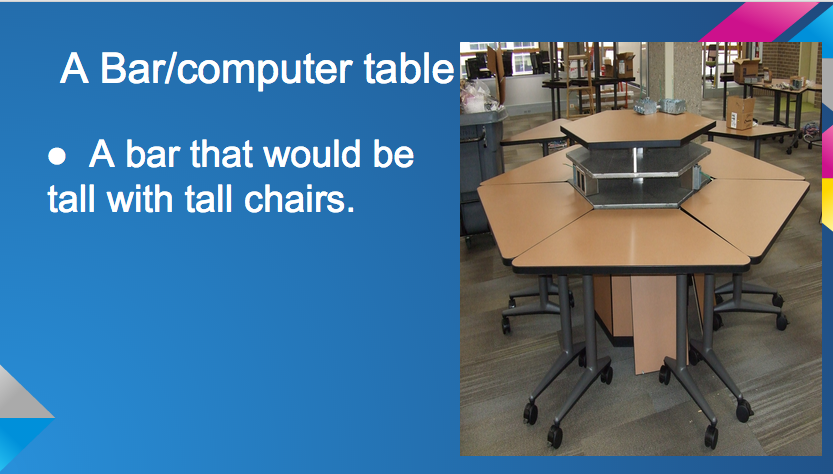
For my 5th and 6th grade classes, I am introducing them to project based learning. Currently my students are using Google Apps for Education (GAFE) to research, collaborate, create and present their own redesigned computer lab. My students are utilizing online catalogs to determine the furniture that they would like in the space, and are then obtaining quotes and pricing out the costs associated with their designs. The students are creating their presentations and layouts using Google Docs, which allows them to share their documents among the group and to also share the information with me. This type of real world experience is facilitate by the use of Web 2.0 tools, and allows students to use tools that many will be expected to use in the work place. 


Work in progress: on of the slides from my students' presentation

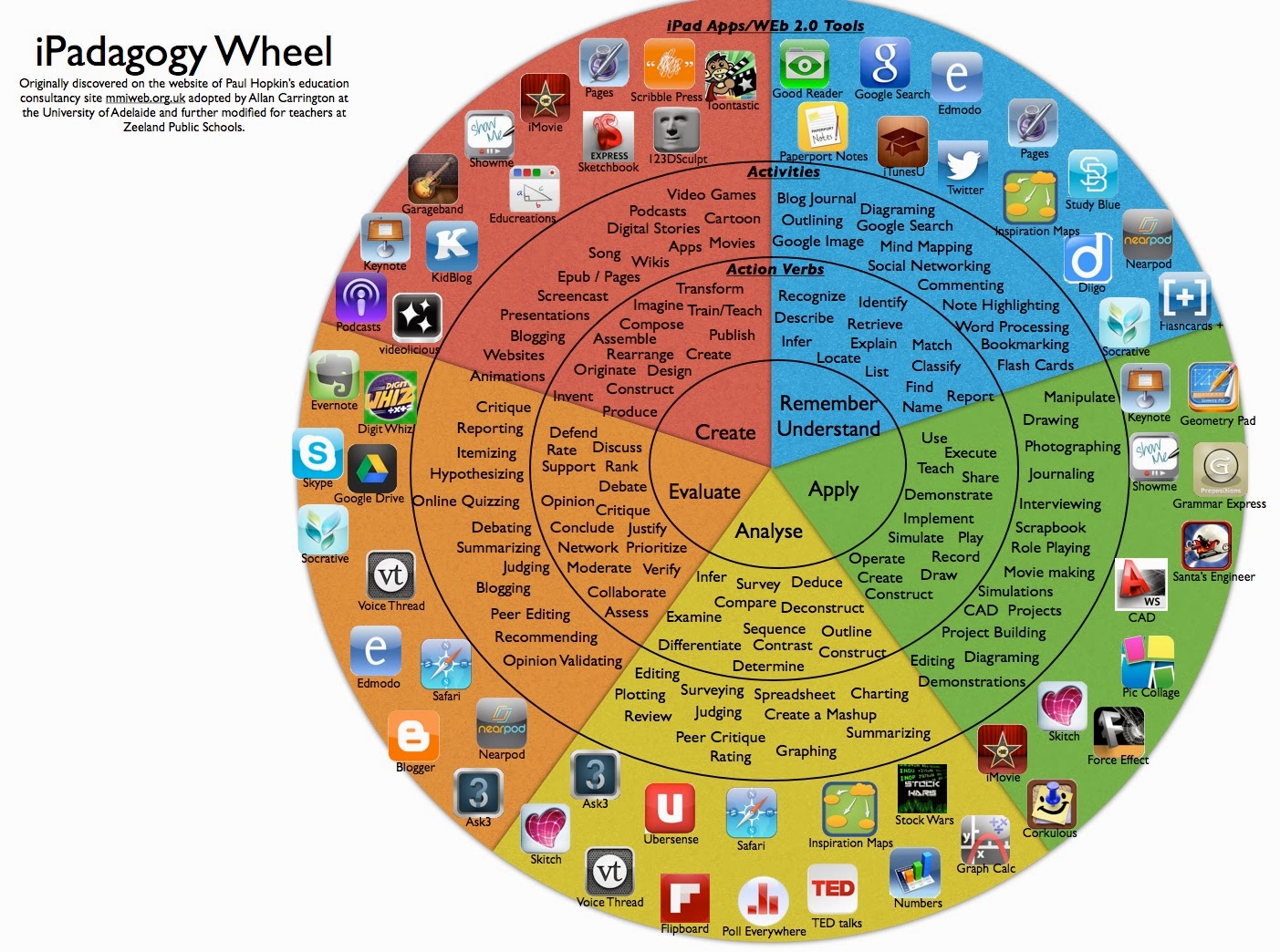
Web 2.0 tools allow students to have the opportunity to participate in higher order thinking, often at the highest levels of Bloom's Taxonomy, providing opportunities to create and evaluate instead of simply to read, remember or understand.